

If you're using the TSI PortaCount for respirator fit testing and encounter a "Low Particles" error message, you're not alone. This common issue can disrupt your testing process, but fortunately, it's often easy to fix. In this guide, we'll walk you through the troubleshooting steps and environmental factors that may be affecting your results.
Common Causes of the "Low Particles" Error on the TSI PortaCount Pro
The "Low Particles" error typically occurs when the PortaCount detects an insufficient number of ambient particles to complete a fit test. This can be caused by:
- Low alcohol levels
- Testing in a highly filtered air environment
- Improper or worn-out alcohol wicks
- Environmental conditions
Understanding the "Low Particles" Error on the TSI PortaCount
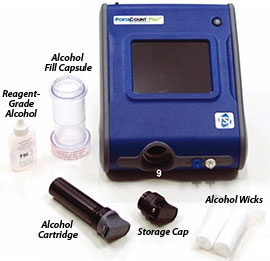
TSI PortaCount is giving me a "Low Particles" error message. What do I do? This question comes up fairly often with PortaCount users. And TSI covers it in detail in the Troubleshooting section of the PortaCount user manual. TSI recommends, as the first troubleshooting step, to replenish the alcohol supply in the wick.
Steps to Replenish the Alcohol Supply
- First, take the white cylindrical wick out of the alcohol cartridge and set it aside to dry. You'll be able to reuse it later.
- Next, pour out any alcohol that's in the fill capsule, and replace it with a new bottle. Note: If you're not using an alcohol bottle from TSI, make sure what you use is reagent-grade (99.5% or better) isopropyl alcohol.
- Put a fresh white alcohol wick (your rental kit comes with two) into the alcohol fill capsule and let it sit for five minutes.
- Then, take the wick from the fill capsule and put it into the alcohol cartridge.
- Reinstall the cartridge into the PortaCount, and re-run your daily test.
Environmental Factors That May Affect Your PortaCount Test
If your test still doesn't pass, it may be your environment. TSI recommends testing in an enclosed space of 400 square feet or smaller. Some customers have told us they improved the environment by sealing off any vents and closing the doors to keep particles from escaping. If your office uses high-efficiency air-handling filters, you may need to add a particle generator.
Using a TSI Particle Generator to Improve Testing Conditions
If you're testing in an environment with minimal ambient particles, using a TSI Particle Generator can help ensure consistent and accurate fit test results. This device adds small, non-harmful particles into the air, allowing the PortaCount to function properly. It's particularly useful in spaces with high-efficiency air filtration or low-dust environments.
Troubleshooting Checklist for TSI PortaCount Tests
Before performing a fit test, run through this quick checklist:
- Is the alcohol wick fresh and properly saturated?
- Are you using reagent-grade (99.5% or better) isopropyl alcohol?
- Is the test area enclosed and free from excessive ventilation?
- If needed, have you added a particle generator?
- Have you sealed off vents or closed doors to maintain particle levels?
A Quick Reminder: Check Your Fit Testing Calendar
As summer approaches, school ends, and family vacations start, it can be harder to get your employees to be available for fit testing. Try fit testing before summer to make sure you don't miss any compliance dates.
Need More Help? Explore Our TSI PortaCount Resources
For more tips, see our blog category on respirator fit testing, or visit the TSI PortaCount Pro quantitative respirator fit test system page. Need replacement alcohol wicks, a particle generator, or expert troubleshooting support? Contact our team today for assistance!


